Overview
A small acupuncture clinic with six treatment rooms, two providers, and one front desk managing all of it. Every morning, that desk spent 15–20 minutes copying the day's schedule from Jane App into Google Sheets by hand — every patient name, room assignment, and appointment note. Typos were common. On busy mornings, the stress was real.
I built an automation that does the same work in one click. Then I kept building — adding features as I understood the workflow better, until the tracker started anticipating things staff hadn't thought to ask for.
The goal: Eliminate manual morning data entry. Build something the team could trust and actually enjoy using.
How it works
Staff drop the day's Jane export into a shared Drive folder. One click on Create Sheet from Latest Jane Export does the rest — the script builds a fully populated daily tab in seconds, named and ready to use.
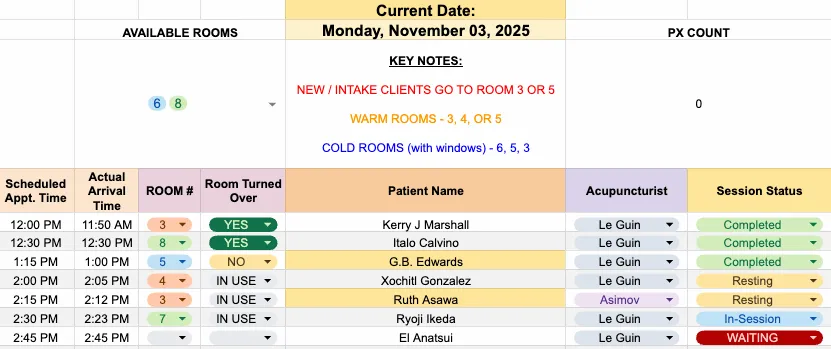
A live view everyone shares
The tracker is open all day on the front desk and on each practitioner's iPad. When a patient's status is updated to Waiting, the provider sees it even if they're with someone else. The whole clinic stays coordinated without anyone having to interrupt anyone. It's the host stand app for a busy restaurant — everyone on the floor reading the same board.
New patient highlighting flags any appointment at the standard new patient duration. No more counting line by line — staff can see at a glance how many welcome packets to set out before the day starts. It replaced something they used to do by hand.
Rooms available is a live chip display at the top of the sheet. Mark a room In Use, and it drops off the list. I added this after watching front desk staff sweep the whole sheet — and sometimes the whole clinic — just to find one open room.
End of day
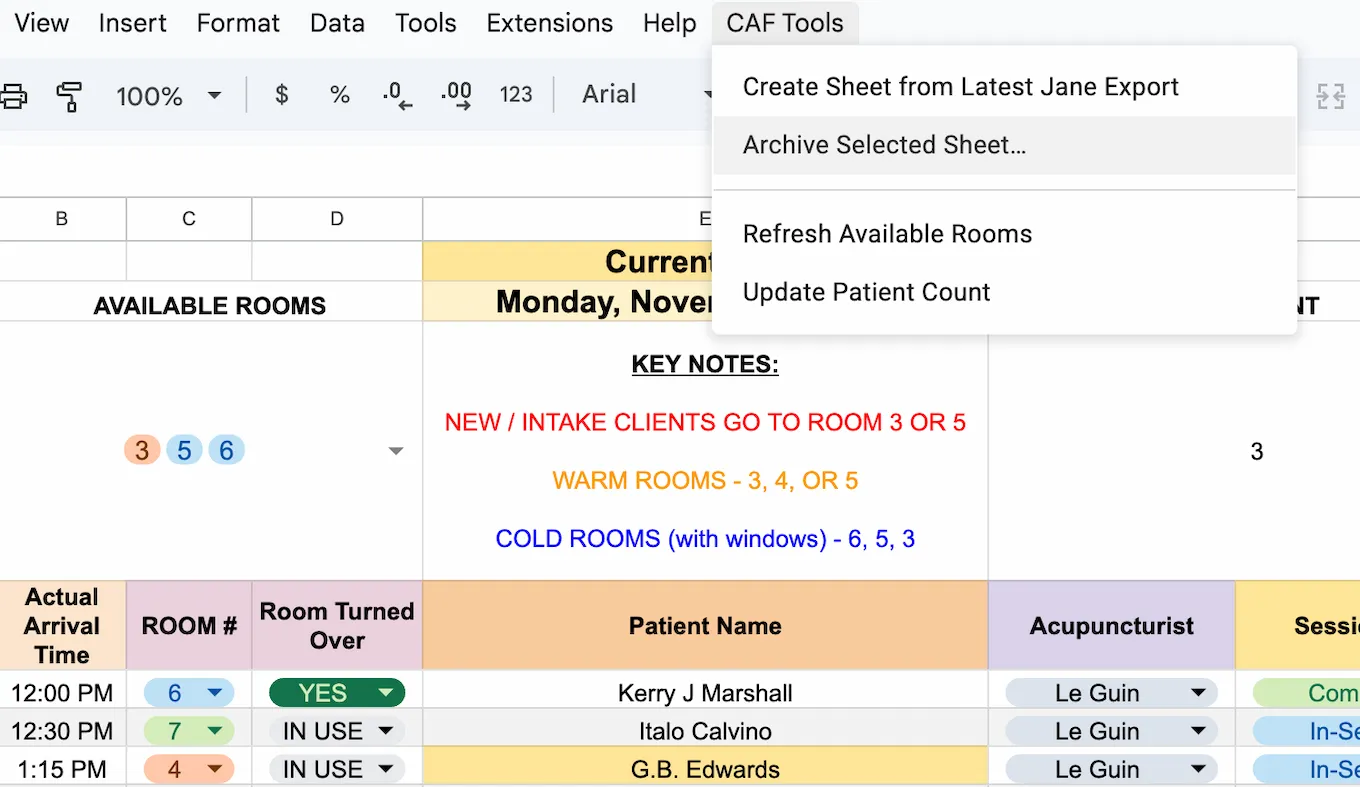
One click on Archive Selected Sheet saves the day's data to a dated file in Drive and clears the tracker. The board is ready for tomorrow. Before this, archiving meant taking a screenshot, finding the right Drive folder, and uploading it — a task that was regularly skipped. Now it gets done because it's the same button that closes out the day.
Reflection
The features that matter most in this tracker weren't in the original brief. They came from watching the clinic run — noticing where staff hesitated, what they were scanning for, what they were still doing by hand. The available rooms indicator came from watching someone sweep the entire sheet with their eyes just to find one open room. The new patient highlight came from watching someone count appointment types manually before setting out welcome packets. Both were small builds. Both are used every single day.
The same logic applies anywhere staff are navigating shared resources under time pressure — a clinic, a field team, a warehouse floor.
A task people work around isn't a workflow problem. It's a design problem.